Power User Features
Keyboard shortcuts, quick actions, and command palette for maximum efficiency. Work faster with expert-level tools.
Why Power User Features?
Command Palette
Access any action instantly with Cmd/Ctrl+Shift+P. Search commands, open cases, jump to features - all without leaving the keyboard.
Smart Paste
Paste data from any source and BART intelligently maps it to the right fields. Works with Excel, PDFs, carrier portals, and more.
Bulk Actions
Select multiple plans or employees and apply changes in batch. Update rates, toggle plans, or export selections all at once.
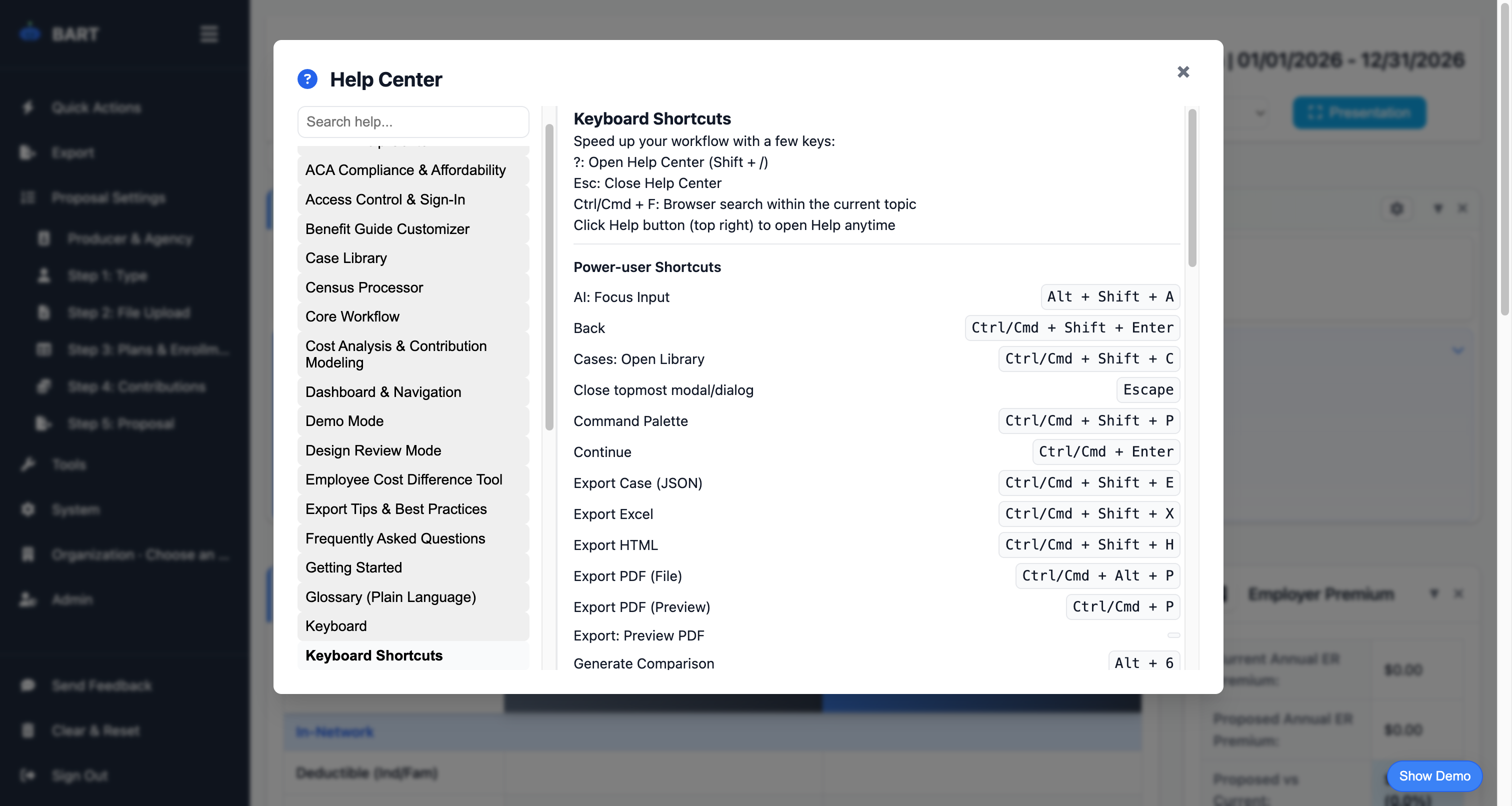
Keyboard Shortcuts
Navigate, export, and manage proposals without touching your mouse. Over 30 shortcuts available for every common action.
Fast Navigation
Jump between steps, open cases, and switch views with single keystrokes. Tab through fields with smart focus management.
Quick Actions Menu
Right-click context menus and quick action buttons provide fast access to common operations.
Popular Keyboard Shortcuts
Press ? or Shift + / in BART to see all available shortcuts
Quick Actions Menu
Access common actions without leaving your keyboard. Open the Quick Actions menu to:
Ready to Try This Feature?
Start your free proposal today and see the difference.
✓ No credit card required • ✓ Free during beta • ✓ Cancel anytime